有人给 Multiple Select 插件 提了问题:
setSelects doesn't work in Firefox when using jquery 1.9.0 一直都在用 jQuery 1.8.3 的版本,没有尝试过 jQuery 1.9.0 的版本。
于是,开始调试代码,在 1.9.0 的版本中:
点击 checkbox,结果都是 undefined
而在 1.8.3 的版本中,结果是 checked 和 undefined
到这里,问题答案找到了,就是使用 attr() 方法的问题,于是查看官方文档, 才知道从 jQuery 1.6 开始新增了一个方法 prop(),但是一直都没有使用过。
从中文意思看,两者分别是获取/设置 attributes 和 properties 的方法,那么为什么还要增加 prop() 方法呢?
Before jQuery 1.6, the .attr() method sometimes took property values into account when retrieving some attributes, which could cause inconsistent behavior.
因为在 jQuery 1.6 之前,使用 attr() 有时候会出现不一致的行为。
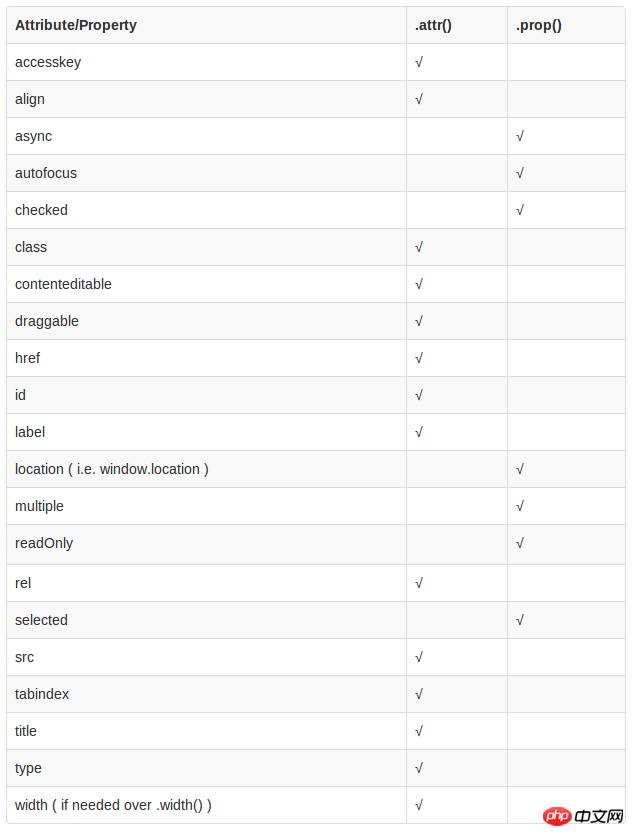
那么,什么时候使用attr(),什么时候使用prop()?
To retrieve and change DOM properties such as the checked, selected, or disabled state of form elements, use the .prop() method.
根据官方的建议:具有 true 和 false 两个属性的属性,如 checked, selected 或者 disabled 使用prop(),其他的使用 attr()
到此,将 attr('checked') 改成 prop('checked') 即可修复提的 issues 了。
等等,貌似问题还没真正解决,为什么开头例子中 jQuery 1.8.3 和 1.9.0 使用 attr() 会有所区别呢?
想知道他们的区别,最好的办法还是看他们的源代码:
1.8.3 attr():
attr: function( elem, name, value, pass ) {    var ret, hooks, notxml,
        nType = elem.nodeType;    // don't get/set attributes on text, comment and attribute nodes
    if ( !elem || nType === 3 || nType === 8 || nType === 2 ) {        return;
    }    if ( pass && jQuery.isFunction( jQuery.fn[ name ] ) ) {        return jQuery( elem )[ name ]( value );
    }    // Fallback to prop when attributes are not supported
    if ( typeof elem.getAttribute === "undefined" ) {        return jQuery.prop( elem, name, value );
    }

    notxml = nType !== 1 || !jQuery.isXMLDoc( elem );    // All attributes are lowercase
    // Grab necessary hook if one is defined
    if ( notxml ) {
        name = name.toLowerCase();
        hooks = jQuery.attrHooks[ name ] || ( rboolean.test( name ) ? boolHook : nodeHook );
    }    if ( value !== undefined ) {        if ( value === null ) {
            jQuery.removeAttr( elem, name );            return;

        } else if ( hooks && "set" in hooks && notxml && (ret = hooks.set( elem, value, name )) !== undefined ) {            return ret;

        } else {
            elem.setAttribute( name, value + "" );            return value;
        }

    } else if ( hooks && "get" in hooks && notxml && (ret = hooks.get( elem, name )) !== null ) {        return ret;

    } else {

        ret = elem.getAttribute( name );        // Non-existent attributes return null, we normalize to undefined
        return ret === null ?
            undefined :
            ret;
    }
}
1.9.0 attr():
 attr: function( elem, name, value, pass ) {
  var ret, hooks, notxml,
        nType = elem.nodeType;
  // don't get/set attributes on text, comment and attribute nodes
    if ( !elem || nType === 3 || nType === 8 || nType === 2 ) {
           return;
    }
   if ( pass && jQuery.isFunction( jQuery.fn[ name ] ) ) {
        return jQuery( elem )[ name ]( value );
    }
        // Fallback to prop when attributes are not supported
    if ( typeof elem.getAttribute === "undefined" ) {
         return jQuery.prop( elem, name, value );
    }

    notxml = nType !== 1 || !jQuery.isXMLDoc( elem );
   // All attributes are lowercase
    // Grab necessary hook if one is defined
    if ( notxml ) {
        name = name.toLowerCase();
        hooks = jQuery.attrHooks[ name ] || ( rboolean.test( name ) ? boolHook : nodeHook );
    }
   if ( value !== undefined ) {
       if ( value === null ) {
            jQuery.removeAttr( elem, name );
            return;

        } else if ( hooks && "set" in hooks && notxml && (ret = hooks.set( elem, value, name )) !== undefined ) {
            return ret;

        } else {
            elem.setAttribute( name, value + "" );
             return value;
        }

    } else if ( hooks && "get" in hooks && notxml && (ret = hooks.get( elem, name )) !== null ) {
               return ret;

    } else {

        ret = elem.getAttribute( name );
      // Non-existent attributes return null, we normalize to undefined
        return ret === null ?
            undefined :
            ret;
    }
}
1.8.3 和 1.9.0 的 prop() 是一样的:
prop: function( elem, name, value ) {
  var ret, hooks, notxml,
   nType = elem.nodeType;
   // don't get/set properties on text, comment and attribute nodes
    if ( !elem || nType === 3 || nType === 8 || nType === 2 ) {
    return;
    }

    notxml = nType !== 1 || !jQuery.isXMLDoc( elem );
    if ( notxml ) {
    // Fix name and attach hooks
        name = jQuery.propFix[ name ] || name;
        hooks = jQuery.propHooks[ name ];
    }
     if ( value !== undefined ) {
         if ( hooks && "set" in hooks && (ret = hooks.set( elem, value, name )) !== undefined ) {
          return ret;

        } else {
        return ( elem[ name ] = value );
        }

    } else {
       if ( hooks && "get" in hooks && (ret = hooks.get( elem, name )) !== null ) {
       return ret;

        } else {
        return elem[ name ];
        }
    }
}
首先,我们看下 attr() 和 prop() 的区别:
attr() 里面,最关键的两行代码
elem.setAttribute( name, value + "" );
ret =  elem.getAttribute( name );
很明显的看出来,使用的 DOM 的 API setAttribute() 和 getAttribute() 方法操作的属性元素节点。
prop() 里面,最关键的两行代码
return ( elem[ name ] = value );return elem[ name ];
可以理解为 document.getElementById(el)[name] = value,这是转化成 element 的一个属性。
对比调试 1.9.0 和 1.8.3 的 attr() 方法,发现两者的区别在于
hooks.get( elem, name ))
返回的值不一样,具体的实现:
1.8.3 中
boolHook = {
    get: function( elem, name ) {
    // Align boolean attributes with corresponding properties
        // Fall back to attribute presence where some booleans are not supported
        var attrNode,
            property = jQuery.prop( elem, name );
            return property === true || typeof property !== "boolean" && ( attrNode = elem.getAttributeNode(name) ) && attrNode.nodeValue !== false ?
            name.toLowerCase() :
             undefined;
    }
}
1.9.0 中
boolHook = {    get: function( elem, name ) {
 var
            // Use .prop to determine if this attribute is understood as boolean
            prop = jQuery.prop( elem, name ),
              // Fetch it accordingly
            attr = typeof prop === "boolean" && elem.getAttribute( name ),
            detail = typeof prop === "boolean" ?

                getSetInput && getSetAttribute ?
                    attr != null :
                     // oldIE fabricates an empty string for missing boolean attributes
                    // and conflates checked/selected into attroperties
                    ruseDefault.test( name ) ?
                        elem[ jQuery.camelCase( "default-" + name ) ] :
                        !!attr :
                         // fetch an attribute node for properties not recognized as boolean
                elem.getAttributeNode( name );
                 return detail && detail.value !== false ?
            name.toLowerCase() :
            undefined;
    }
}
由此可见,1.9.0 开始不建议使用 attr() 来对具有 true 和 false 两个属性的属性进行操作了。
那么我们的结论是:
具有 true 和 false 两个属性的属性,如 checked, selected 或者 disabled 使用prop(),其他的使用 attr(),具体见下表: