



1,创建winform窗体应用程序
2,在界面上拖入DataGridView控件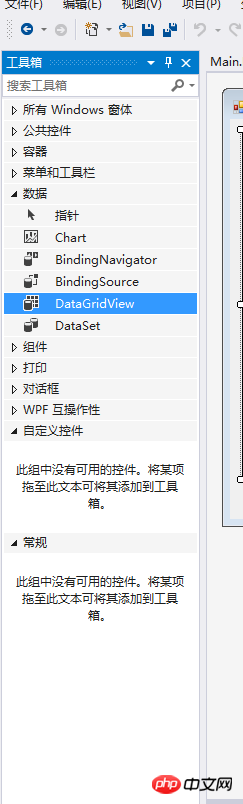
3,添加相应的列如图: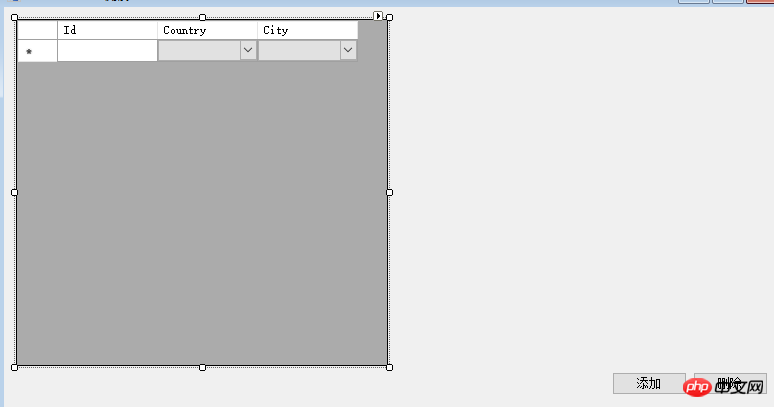

4,开始编写后面的代码:
private DataTable CountryDt = new DataTable();
private DataTable CityDt = new DataTable();
public Main()
{
InitializeComponent();
InitCountryDt();
InitCityDt();
InitGrid();
}
private void InitCityDt()
{
string[] citys = { "CN|1|北京", "CN|2|天津", "CN|3|山西", "JP|4|大阪", "JP|5|横滨", "JP|6|名古屋", "JP|7|神户", "US|8|纽约"
, "US|9|洛杉矶", "US|10|芝加哥", "US|11|休斯敦", "US|12|费城", "US|13|旧金山"};
CityDt.Columns.Add("cityCode");
CityDt.Columns.Add("cityName");
CityDt.Columns.Add("Pid");
for (int i = 0; i {
var newRow = CityDt.NewRow();
newRow["cityCode"] = citys[i].Split('|')[1];
newRow["cityName"] = citys[i].Split('|')[2];
newRow["Pid"] = citys[i].Split('|')[0];
CityDt.Rows.Add(newRow);
}
}
private void InitCountryDt()
{
string[] countrys = { "CN|中国", "JP|日本", "US|美国" };
CountryDt.Columns.Add("countryCode");
CountryDt.Columns.Add("countryName");
for (int i = 0; i {
var newRow = CountryDt.NewRow();
newRow["countryCode"] = countrys[i].Split('|')[0];
newRow["countryName"] = countrys[i].Split('|')[1];
CountryDt.Rows.Add(newRow);
}
}
private void InitGrid()
{
var dt = new DataTable();
dt.Columns.Add("Id");
dt.Columns.Add("CountryCode");
dt.Columns.Add("CityCode");
for (int i = 10; i {
var newRow = dt.NewRow();
newRow["Id"] = i.ToString();
dt.Rows.Add(newRow);
}
dataGridView1.DataSource = dt;
}
private void btnAdd_Click(object sender, EventArgs e)
{
var dt = dataGridView1.DataSource as DataTable;

产品简介: 网奇IOS智能订单系统,是网奇公司研发的一款智能在线订单编辑以及管理系统。本系统适合使用在;在线报名、酒店预定、信息反馈、在线订单和在线投诉等等诸多应用上。本系统所有选项字段完全通过后台控制,在线报名系统可以变为在线预定系统,同时可以变为任何其它的系统,里面的栏目字段,可以任意添加、删除、 修改。本系统为网奇公司全国独家首创,顺应网络需求,安装十分便利,上传即可使用。产品特色:
var newRow = dt.NewRow();
newRow["Id"] = dt.Rows.Count + 1;
dt.Rows.Add(newRow);
for (int i = 0; i {
var countryCell = new DataGridViewComboBoxCell();
countryCell.DataSource = CountryDt;
countryCell.ValueMember = "countryCode";
countryCell.DisplayMember = "countryName";
dataGridView1.Rows[i].Cells["countryCode"] = countryCell;
}
}
private void dataGridView1_CellValueChanged(object sender, DataGridViewCellEventArgs e)
{
var dt = this.dataGridView1.DataSource as DataTable;
if (dataGridView1.Columns[e.ColumnIndex].Name == nameof(CountryCode))
{
var countryCode = dataGridView1.Rows[e.RowIndex].Cells[e.ColumnIndex].Value;
var drs = CityDt.Select("Pid='" + countryCode + "'");
var newCityDt = new DataTable();
newCityDt.Columns.Add("cityCode");
newCityDt.Columns.Add("cityName");
newCityDt.Columns.Add("Pid");
foreach (DataRow row in drs)
{
var newRow = newCityDt.NewRow();
newRow["cityCode"] = row["cityCode"];
newRow["cityName"] = row["cityName"];
newRow["Pid"] = row["Pid"];
newCityDt.Rows.Add(newRow);
}
var cityCell = new DataGridViewComboBoxCell();
cityCell.DataSource = newCityDt;
cityCell.DisplayMember = "cityName";
cityCell.ValueMember = "cityCode";
dataGridView1.Rows[e.RowIndex].Cells["CityCode"] = cityCell;
}
}
private void Main_Load(object sender, EventArgs e)
{
var vdt = dataGridView1.DataSource as DataTable;
for (int i = 0; i {
var cell = new DataGridViewComboBoxCell()
{
DisplayMember = "countryName",
ValueMember = "countryCode",
DataSource = CountryDt
};
dataGridView1.Rows[i].Cells["CountryCode"] = cell;
if (i % 2 == 0)
{
dataGridView1.Rows[i].Cells["CountryCode"].Value = "JP";
dataGridView1.Rows[i].Cells["CityCode"].Value = new Random().Next(4, 7);
}
//else {
// dataGridView1.Rows[i].Cells["CountryCode"].Value = "CN";
//}
if (i % 5 == 0)
{
dataGridView1.Rows[i].Cells["CountryCode"].Value = "CN";
dataGridView1.Rows[i].Cells["CityCode"].Value = new Random().Next(1, 3);
}
if (i % 9 == 0)
{
dataGridView1.Rows[i].Cells["CountryCode"].Value = "US";
dataGridView1.Rows[i].Cells["CityCode"].Value = new Random().Next(8, 13);
}
}
}
private void btnRemove_Click(object sender, EventArgs e)
{
var selected = dataGridView1.SelectedRows;
var dt = dataGridView1.DataSource as DataTable;
if (selected.Count > 0)
{
for (var i = 0; i {
var row = selected[i];
dt.Rows.RemoveAt(row.Index);
}
}
}




