



这篇文章主要介绍了asp.net管理信息系统中数据统计功能的实现方法,需要的朋友可以参考下
数据统计是每个系统中必备的功能,在给领导汇报统计数据,工作中需要的进展数据时非常有用。
在我看来,一个统计的模块应该实现以下功能:
能够将常用的查询的统计结果显示出来;
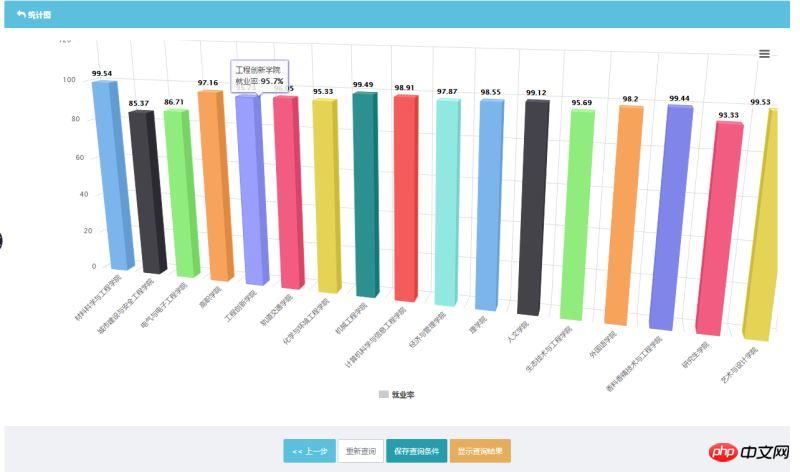
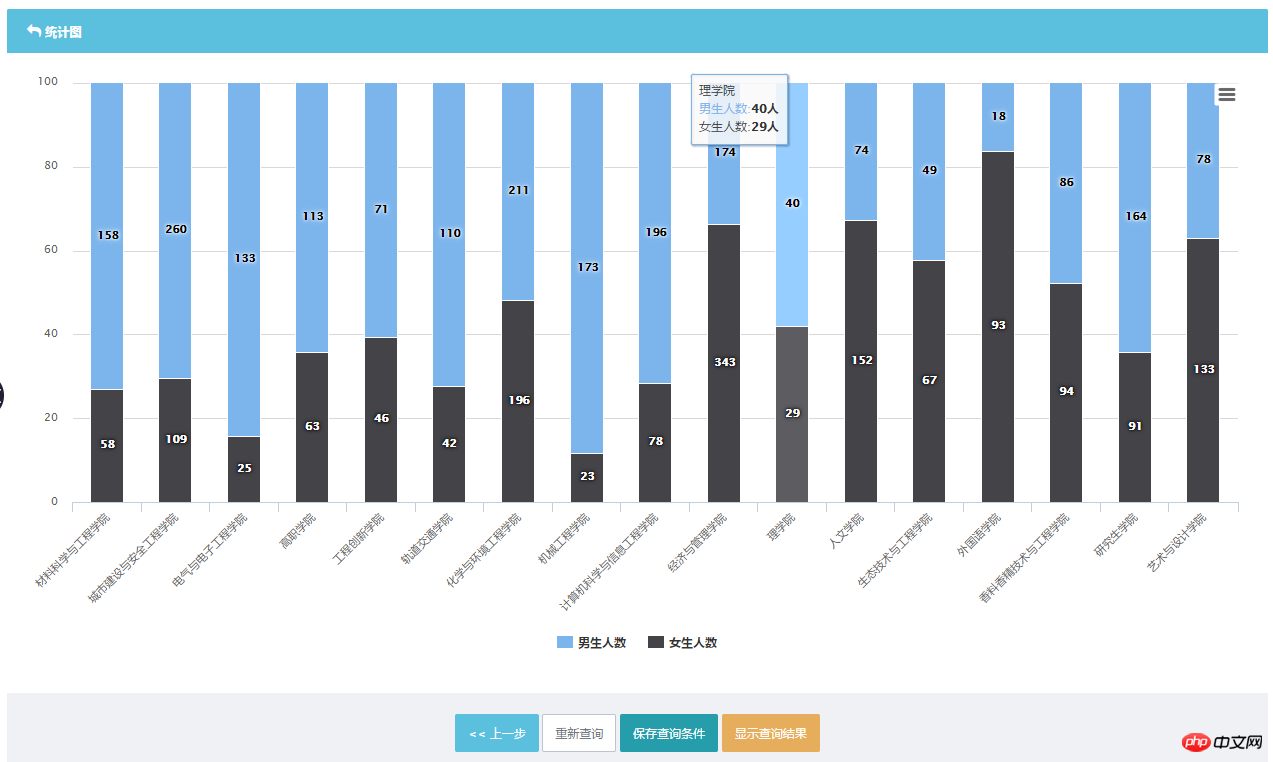
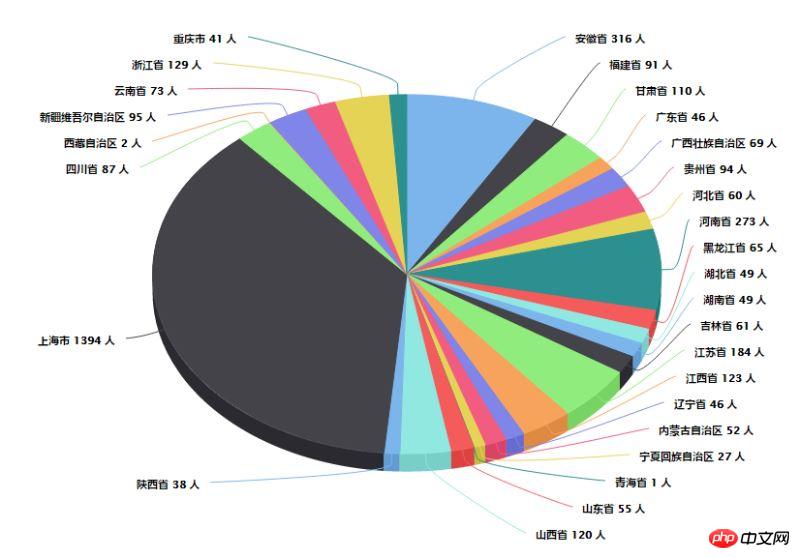
显示的结果可以是表格形式,也可以是图形形式,如果是图形的话能够以多种形式显示(柱状图、折线图、饼图、雷达图、堆叠柱状图等):
统计查询的结果,点击数字或者百分比能够显示详细的数据;
能够自由组合查询条件、筛选条件、分组条件、排序等;
统计结果最好有个实时预览;
查询统计能够保存,以便下次能直接调用并显示统计查询的结果;
对于保存后的查询统计,下次调用时也可以按照灵活的筛选手段对查询结果进行筛选;
界面需要做的简洁、直观,就算是不太懂电脑的操作员也能够方便使用;
对于一些复杂的查询,能够直接在后台写Sql或者调用Sp出数据
......
好了,以下是在实际环境中的实现和应用:
这是一个学生的就业系统,学生在不同的时期会对自己毕业去向进行登记,因此按照不同时间截点统计出来的数据是不一样的。数据表有100多个字段(并不是所有字段都需要统计)。

部分功能简介:商品收藏夹功能热门商品最新商品分级价格功能自选风格打印结算页面内部短信箱商品评论增加上一商品,下一商品功能增强商家提示功能友情链接用户在线统计用户来访统计用户来访信息用户积分功能广告设置用户组分类邮件系统后台实现更新用户数据系统图片设置模板管理CSS风格管理申诉内容过滤功能用户注册过滤特征字符IP库管理及来访限制及管理压缩,恢复,备份数据库功能上传文件管理商品类别管理商品添加/修改/
首先,我们在数据库中构建一个表值函数,能够按照不同的时间截点返回出数据,表也起到视图的作用,将参数表的值直接包含到返回结果中去。
ALTER FUNCTION [dbo].[Get.............]
(
 @gxsj datetime
)
RETURNS TABLE
AS
RETURN
(
 select t1.*,
 dbo.depacode.xymc,
 CASE t1.xldm WHEN '01' THEN '博士' WHEN '11' THEN '硕士' WHEN '25' THEN '双学位' WHEN '31' THEN '本科' WHEN '41' THEN '专科' WHEN '61' THEN '高职' ELSE '' END AS xlmc,
 CASE WHEN LEFT(t1.sydqdm, 2) IN ('11', '12', '13', '21', '31', '32', '33', '35', '37', '44', '46', '71', '81', '82') THEN '东部'
 WHEN LEFT(t1.sydqdm, 2) IN ('14', '22', '23', '34', '36', '41', '42', '43') THEN '中部'
 WHEN LEFT(t1.sydqdm, 2) IN ('15', '45', '51', '50', '52', '53', '54', '61', '62', '65', '63', '64') THEN '西部' ELSE '' END AS sydq,
 sydq.dwdqmc AS sysf,
 CASE WHEN LEFT(t1.dwdqdm, 2) IN ('11', '12', '13', '21', '31', '32', '33', '35', '37', '44', '46', '71', '81', '82') THEN '东部'
 WHEN LEFT(t1.dwdqdm, 2) IN ('14', '22', '23', '34', '36', '41', '42', '43') THEN '中部'
 WHEN LEFT(t1.dwdqdm, 2) IN ('15', '45', '51', '50', '52', '53', '54', '61', '62', '65', '63', '64') THEN '西部' ELSE '' END AS dwdq,
  dwdq.dwdqmc AS dwsf, dbo.Entcode.hyname,
 dbo.hydygx.hymldm, dbo.hydygx.hyml,
 CASE t1.xbdm WHEN 1 THEN '男' WHEN 2 THEN '女' ELSE '男' END AS xbmc,
 [mzdmb].[nation] AS mzmc,
 [EjByqxdmb].[Ejbyqxmc], dbo.byqxdygx.jybbyqx, t1.gn500 AS jybdwxzdm,
 CASE t1.knslbdm WHEN '7' THEN '就业困难、家庭困难和残疾' WHEN '6' THEN '家庭困难和残疾' WHEN '5' THEN '就业困难和残疾' WHEN '4' THEN '残疾' WHEN '3' THEN '就业和家庭困难' WHEN '2' THEN '家庭困难' WHEN '1' THEN '就业困难' ELSE '非困难生' END AS Knslb
 from [table] as t1
 LEFT OUTER JOIN
 dbo.depacode ON t1.xydm = dbo.depacode.xydm LEFT OUTER JOIN
 dbo.dwdq AS sydq ON LEFT(t1.sydqdm, 2) + '0000' = sydq.dwdqdm LEFT OUTER JOIN
 dbo.dwdq AS dwdq ON LEFT(t1.dwdqdm, 2) + '0000' = dwdq.dwdqdm LEFT OUTER JOIN
 dbo.Entcode ON t1.hylb = dbo.Entcode.hycode LEFT OUTER JOIN
 dbo.hydygx ON t1.hylb = dbo.hydygx.hydldm LEFT OUTER JOIN
 [mzdmb] ON t1.mzdm = [mzdmb].[mzdm] LEFT OUTER JOIN
 [EjByqxdmb] ON t1.byqx2 = [EjByqxdmb].[Ejbyqxdm] LEFT OUTER JOIN
 dbo.byqxdygx ON t1.byqx = dbo.byqxdygx.shbyqx AND
 t1.dwxzdm = dbo.byqxdygx.shdwxzdm
 where [gxsj] <= dateadd(day,1,@gxsj) and HisId in
 (SELECT TOP 1 HisId FROM [table]
 WHERE [gxsj] <= dateadd(day,1,@gxsj) and xsxh = t1.xsxh
 and bynf = t1.bynf and t1.byqx not in ('08','05','11')
 ORDER BY [gxsj] DESC)
)
这样我们使用 select * from [get...]('2016-8-25') 就可以查询出8月25日截止日期的数据。
接下来是界面设计,我们使用jequery-ui中dropable\dragable的控件,字段排列在界面上,直接拖拽到相应域里,就能够进行统计。
除了分组字段外,显示字段还能够按照具体的值进行统计过滤,起到多重分组统计的功能。
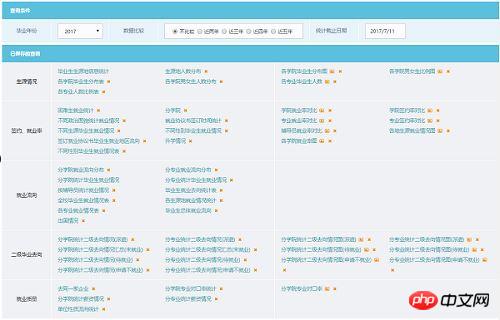
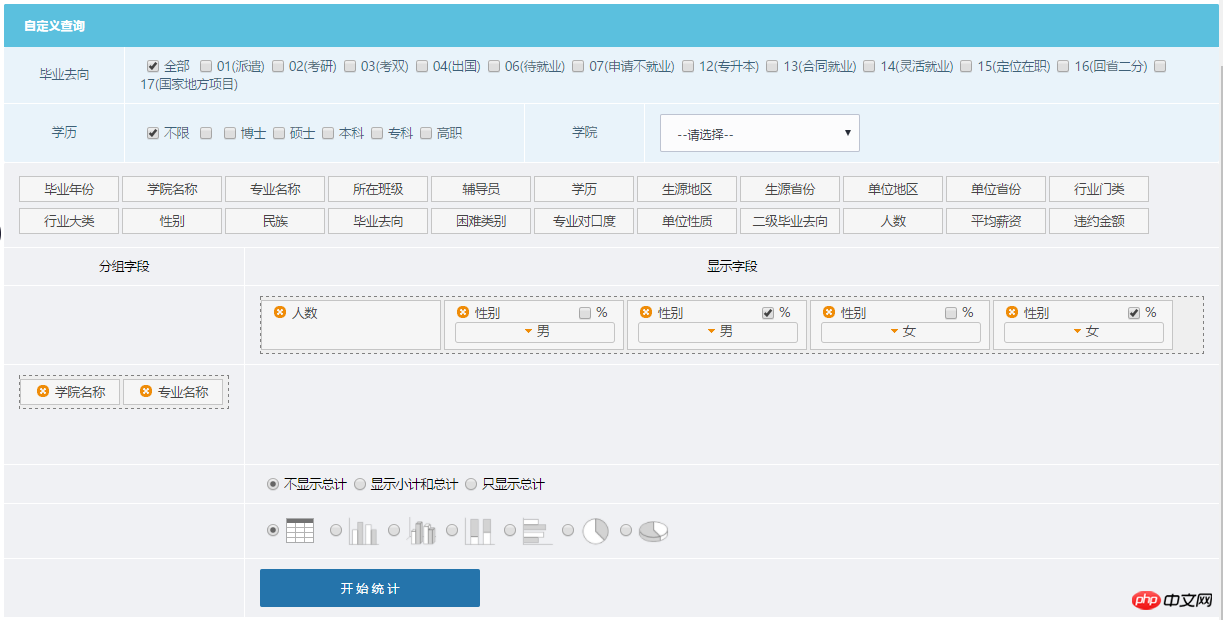
大家可以看到,最上面一栏是数据筛选,然后是系统已经保存的查询(分为表格查询和图形查询),点击保存好的查询直接出查询结果,也可以删除保存的查询。在下面是自定义查询,上面是一排条件,然后是可以拖拽的字段,当字段拖至分组列,则显示字段名称;拖至显示列,还可以对显示的数据的具体值进行分组筛选统计。下方则是一些选项,是否显示小计、总计,以何种方式显示图表。
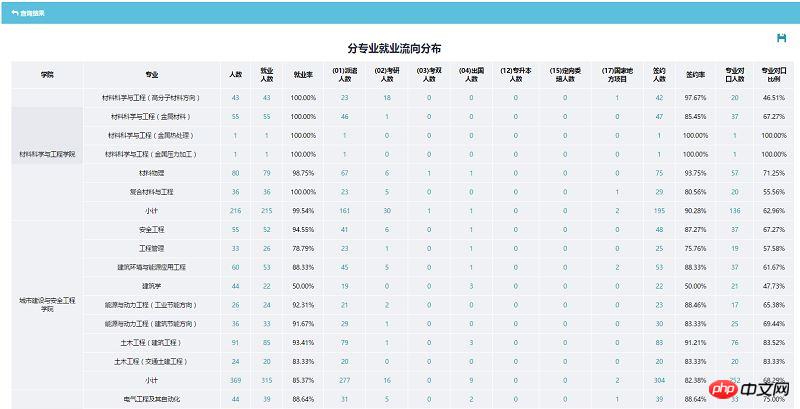
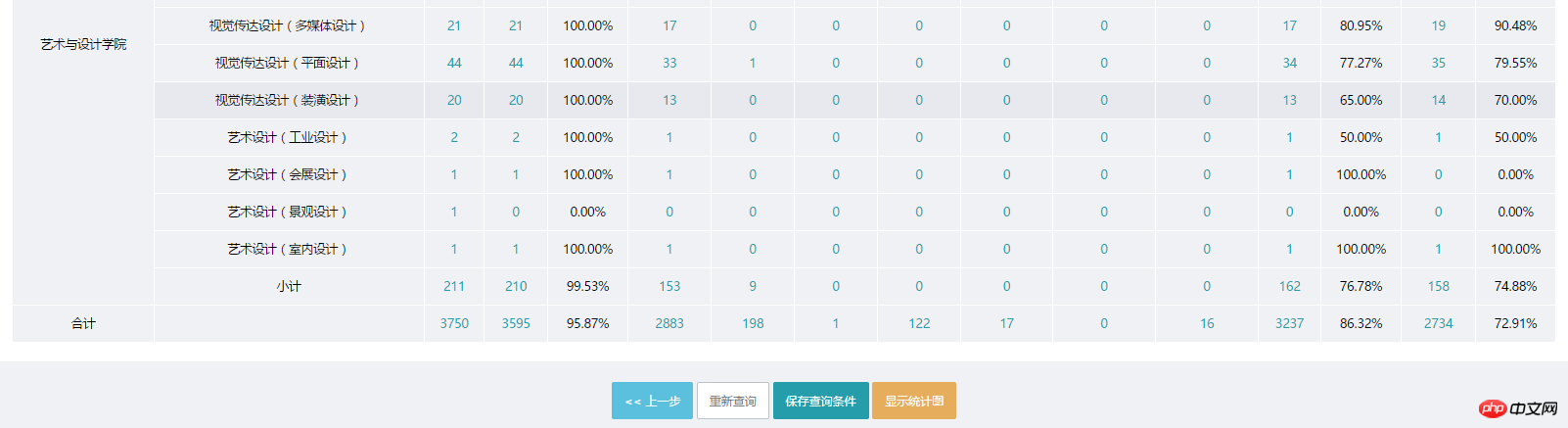
以表格形式的显示统计,可以看到,每个数值都可以点击弹出框显示详情,最下方能够保存查询条件,以图形方式显示等:
图形的展示:
以下是核心类InquireHelper.cs:
字段实体类(部分)
[Serializable]
 [XmlInclude(typeof(BYNF_InquireField))]
 [XmlInclude(typeof(Count_InquireField))]
 [XmlInclude(typeof(XYMC_InquireField))]
 [XmlInclude(typeof(ZYMC_InquireField))]
 [XmlInclude(typeof(SZBJ_InquireField))]
 [XmlInclude(typeof(FDY_InquireField))]
 [XmlInclude(typeof(XL_InquireField))]
 [XmlInclude(typeof(SYDQ_InquireField))]
 [XmlInclude(typeof(SYSF_InquireField))]
 [XmlInclude(typeof(DWDQ_InquireField))]
 [XmlInclude(typeof(DWSF_InquireField))]
 [XmlInclude(typeof(HYML_InquireField))]
 [XmlInclude(typeof(HYDL_InquireField))]
 [XmlInclude(typeof(XBMC_InquireField))]
 [XmlInclude(typeof(MZMC_InquireField))]
 [XmlInclude(typeof(BYQX_InquireField))]
 [XmlInclude(typeof(KNSLB_InquireField))]
 [XmlInclude(typeof(ZYDKL_InquireField))]
 [XmlInclude(typeof(DWXZ_InquireField))]
 [XmlInclude(typeof(EJBYQXMC_InquireField))]
 [XmlInclude(typeof(GZ_InquireField))]
 [XmlInclude(typeof(WYJE_InquireField))]
 public abstract class InquireFieldBase
 {
  public InquireFieldBase()
  {
   FieldItems = this.GetInquireItemsByInquireType();
  }
  [XmlAttribute]
  public int FieldDisplayOrder { get; set; }
  [XmlAttribute]
  public string FieldName { get; set; }
  [XmlAttribute]
  public string DbName { get; set; }
  [XmlAttribute]
  public bool IsAggregate { get; set; }
  [XmlAttribute]
  public InquireHelper.FieldType FieldType { get; set; }
  //用于highchart统计
  [XmlAttribute]
  public bool IsNameField { get; set; }
  //用于统计输出数据
  [XmlAttribute]
  public bool IsPercent { get; set; }
  [XmlIgnore]
  public List FieldItems { get; set; }
  public List FieldValue { get; set; }
  public bool? OrderByAsc { get; set; }
 }
 [Serializable]
 public class BYNF_InquireField : InquireFieldBase
 {
  public BYNF_InquireField()
  {
   FieldDisplayOrder = 1;
   FieldName = "毕业年份";
   DbName = "BYNF";
  }
 }
 [Serializable]
 public class XYMC_InquireField : InquireFieldBase
 {
  public XYMC_InquireField()
  {
   FieldDisplayOrder = 5;
   FieldName = "学院名称";
   DbName = "XYMC";
  }
 }
 [Serializable]
 public class ZYMC_InquireField : InquireFieldBase
 {
  public ZYMC_InquireField()
  {
   FieldDisplayOrder = 6;
   FieldName = "专业名称";
   DbName = "ZYMC";
  }
 }
 [Serializable]
 public class SZBJ_InquireField : InquireFieldBase
 {
  public SZBJ_InquireField()
  {
   FieldDisplayOrder = 7;
   FieldName = "所在班级";
   DbName = "SZBJ";
  }
 }
 [Serializable]
 public class FDY_InquireField : InquireFieldBase
 {
  public FDY_InquireField()
  {
   FieldDisplayOrder = 8;
   FieldName = "辅导员";
   DbName = "FDY";
  }
 }
 [Serializable]
 public class XL_InquireField : InquireFieldBase
 {
  public XL_InquireField()
  {
   FieldDisplayOrder = 9;
   FieldName = "学历";
   DbName = "XLMC";
  }
 }
 [Serializable]
 public class SYDQ_InquireField : InquireFieldBase
 {
  public SYDQ_InquireField()
  {
   FieldDisplayOrder = 10;
   FieldName = "生源地区";
   DbName = "SYDQ";
  }
 }
 [Serializable]
 public class SYSF_InquireField : InquireFieldBase
 {
  public SYSF_InquireField()
  {
   FieldDisplayOrder = 11;
   FieldName = "生源省份";
   DbName = "SYSF";
  }
 }
 [Serializable]
 public class DWDQ_InquireField : InquireFieldBase
 {
  public DWDQ_InquireField()
  {
   FieldDisplayOrder = 12;
   FieldName = "单位地区";
   DbName = "DWDQ";
  }
 }
 [Serializable]
 public class DWSF_InquireField : InquireFieldBase
 {
  public DWSF_InquireField()
  {
   FieldDisplayOrder = 13;
   FieldName = "单位省份";
   DbName = "DWSF";
  }
 }
控制类
public static class InquireHelper
 {
  public static List GetSubInquireList()
  {
   var inquires = new List();
   var subTypeQuery = from t in Assembly.GetExecutingAssembly().GetTypes()
        where IsSubClassOf(t, typeof(InquireFieldBase))
        select t;
   foreach (var type in subTypeQuery)
   {
    InquireFieldBase obj = CreateObject(type.FullName) as InquireFieldBase;
    if (obj != null)
    {
     inquires.Add(obj);
    }
   }
   return inquires;
  }
  static bool IsSubClassOf(Type type, Type baseType)
  {
   var b = type.BaseType;
   while (b != null)
   {
    if (b.Equals(baseType))
    {
     return true;
    }
    b = b.BaseType;
   }
   return false;
  }
  ///
  /// 创建对象(当前程序集)
  ///
  /// 类型名
  /// 创建的对象,失败返回 null
  public static object CreateObject(string typeName)
  {
   object obj = null;
   try
   {
    Type objType = Type.GetType(typeName, true);
    obj = Activator.CreateInstance(objType);
   }
   catch (Exception ex)
   {
   }
   return obj;
  }
  public static List BindCondition(this List conditions, string conditionName, List values)
  {
   var condition = conditions.FirstOrDefault(c => c.GetType().Name == conditionName && c.FieldType == FieldType.ConditionField);
   if (condition == null)
   {
    condition = CreateObject("BLL." + conditionName) as InquireFieldBase;
    condition.FieldType = FieldType.ConditionField;
    conditions.Add(condition);
   }
   condition.FieldValue = values;
   return conditions;
  }
  //public static List BindCondition(this List conditions, string conditionName, string range1, string range2)
  //{
  // var condition = conditions.FirstOrDefault(c => c.GetType().Name == conditionName && c.FieldType == FieldType.ConditionField);
  // if (!string.IsNullOrEmpty(range2)&&!string.IsNullOrEmpty(range1))
  // {
  //  if (condition == null)
  //  {
  //   condition = CreateObject("BLL." + conditionName) as InquireFieldBase;
  //   condition.FieldType = FieldType.ConditionField;
  //   conditions.Add(condition);
  //  }
  //  condition.FieldValue = string.Concat(condition.DbName,
  //   " between to_date('", range1, "', 'yyyy-mm-dd hh24:mi:ss') and to_date('", range2,
  //   "', 'yyyy-mm-dd hh24:mi:ss')");
  // }
  // return conditions;
  //}
  public static DataTable GetDataTable(StatisticsInquire inquire)
  {
   var inquireCond = new List();
   inquire.InquireFields.Where(f => f.FieldType == InquireHelper.FieldType.GroupField).ToList()
    .ForEach(f =>
    {
     if (!f.IsAggregate)
     {
      inquireCond.Add(string.Concat(f.DbName, " AS ", f.FieldName));
     }
    });
   inquire.InquireFields.Where(f => f.FieldType == FieldType.DisplayField).ToList().ToList()
    .ForEach(f => {
     if (f.IsAggregate)
     {
      inquireCond.Add(string.Concat(f.DbName, " AS ", f.FieldName));
     }
     else
     {
      if (f.IsPercent)
      {
       inquireCond.Add(string.Concat("ltrim(Convert(numeric(9,2), SUM(CASE WHEN ", f.DbName, " IN ('", string.Join("', '", f.FieldValue), "') THEN 1 ELSE 0 END)*100.0/Count(*))) + '%' AS '", f.FieldName, ":", string.Join(",", f.FieldValue).SubStr(60), "(%)'"));
      }
      else
      {
       inquireCond.Add(string.Concat("SUM(CASE WHEN ", f.DbName, " IN ('", string.Join("', '", f.FieldValue) , "') THEN 1 ELSE 0 END) AS '", f.FieldName, ":", string.Join(",", f.FieldValue).SubStr(60), "'"));
      }
     }
    });
   var whereCond = new List();
   inquire.InquireFields.Where(f => f.FieldType == InquireHelper.FieldType.ConditionField).ToList()
    .ForEach(f =>
    {
     whereCond.Add(string.Concat(f.DbName, " IN ('", string.Join("','", f.FieldValue), "')"));
    });
   var groupCond = new List();
   inquire.InquireFields.Where(f => f.FieldType == InquireHelper.FieldType.GroupField).ToList()
    .ForEach(f =>
    {
     groupCond.Add(f.DbName);
    });
   var orderbyCond = new List();
   inquire.InquireFields.Where(f => f.FieldType == InquireHelper.FieldType.OrderByField).ToList()
    .ForEach(f =>
    {
     orderbyCond.Add(string.Concat(f.DbName, " ", f.OrderByAsc.GetValueOrDefault() ? "ASC" : "DESC"));
    });
   var sqlStr = string.Concat("SELECT ",
    string.Join(", ", inquireCond),
    " FROM GetStudentStatusByGxsj('", inquire.StatisticsDate , "')",
    whereCond.Any() ? " WHERE " : string.Empty,
    string.Join(" AND ", whereCond),
    groupCond.Any() ? " GROUP BY " : string.Empty,
    (inquire.ShowSubSummary || inquire.ShowSummary)
     ? string.Concat("rollup(", string.Join(", ", groupCond), ")")
     : string.Join(", ", groupCond),
    orderbyCond.Any() ? " ORDER BY " : string.Empty,
    string.Join(", ", orderbyCond));
   var dt = DBUtility.DbHelperSql.Query(sqlStr).Tables[0];
   if (!inquire.ShowSubSummary)
   {
    if (inquire.ShowSummary)
    {
     var col = inquire.InquireFields.Where(f => f.FieldType == InquireHelper.FieldType.GroupField).Count();
     for(int i = dt.Rows.Count - 2; i >=0 ; i -- ){
      if (dt.Rows[i][col - 1].ToString() == "")
      {
       dt.Rows.RemoveAt(i);
       //dt.Rows.Remove[dt.Rows[i]);
      }
     }
    }
   }
   else
   {
    var col = inquire.InquireFields.Where(f => f.FieldType == InquireHelper.FieldType.GroupField).Count();
    for (int i = 0; i < dt.Rows.Count - 1; i++)
    {
     for (int j = 1; j < col; j++)
     {
      if (dt.Rows[i][j].ToString() == "")
      {
       dt.Rows[i][j] = "小计";
       break;
      }
     }
    }
   }
   if (inquire.ShowSubSummary || inquire.ShowSummary)
   {
    dt.Rows[dt.Rows.Count - 1][0] = "合计";
   }
   return dt;
  }
  public static string SubStr(this string str, int maxLength)
  {
   if (str.Length > maxLength)
   {
    return str.Substring(0, maxLength - 1);
   }
   else
   {
    return str;
   }
  }
  public static string ToSerializableXML(this T t)
  {
   XmlSerializer mySerializer = new XmlSerializer(typeof(T));
   StringWriter sw = new StringWriter();
   mySerializer.Serialize(sw, t);
   return sw.ToString();
  }
  public static T ToEntity(this string xmlString)
  {
   var xs = new XmlSerializer(typeof(T));
   var srReader = new StringReader(xmlString);
   var steplist = (T)xs.Deserialize(srReader);
   return steplist;
  }
  public enum FieldType
  {
   DisplayField, GroupField, ConditionField, OrderByField
  }
  private static ConcurrentDictionary> _inquireItems = new ConcurrentDictionary>();
  public static List GetInquireItemsByInquireType(this InquireFieldBase inquireField)
  {
   List inquireItems;
   if (_inquireItems.TryGetValue(inquireField, out inquireItems))
   {
    return inquireItems;
   }
   switch (inquireField.GetType().Name)
   {
    case "XYMC_InquireField":
     inquireItems = new BLL.depacode().GetModelList("").OrderBy(d => d.xydm).Select(d => d.xymc).ToList();
     break;
    case "ZYMC_InquireField":
     inquireItems = new BLL.profcode().GetModelList("").OrderBy(d => d.xydm).ThenBy(d => d.zydm).Select(d => d.zymc).ToList();
     break;
    case "SZBJ_InquireField":
     inquireItems = DbHelperSql.Query("select distinct szbj from jbdate order by szbj").Tables[0].AsEnumerable().Select(b => b["szbj"].ToString()).ToList();
     break;
    case "FDY_InquireField":
     inquireItems = new BLL.DepaUser().GetModelList("").OrderBy(d => d.XYDM).ThenBy(y => y.YHXM).Select(d => d.YHXM).ToList();
     break;
    case "XL_InquireField":
     inquireItems = new[] { "博士", "硕士", "双学位", "本科", "专科", "高职" }.ToList();
     break;
    case "SYDQ_InquireField":
     inquireItems = new[] { "东部", "中部", "西部" }.ToList();
     break;
    case "SYSF_InquireField":
     inquireItems = DbHelperSql.Query("select [Name] from [Sydqdm] where RIGHT([code], 4) = '0000' order by code").Tables[0].AsEnumerable().Select(b => b["Name"].ToString()).ToList();
     break;
    case "DWDQ_InquireField":
     inquireItems = new[] { "东部", "中部", "西部" }.ToList();
     break;
    case "DWSF_InquireField":
     inquireItems = DbHelperSql.Query("select [Name] from [Sydqdm] where RIGHT([code], 4) = '0000' order by code").Tables[0].AsEnumerable().Select(b => b["Name"].ToString()).ToList();
     break;
    case "HYML_InquireField":
     inquireItems = DbHelperSql.Query("select distinct hyml from [hydygx]").Tables[0].AsEnumerable().Select(b => b["hyml"].ToString()).ToList();
     break;
    case "HYDL_InquireField":
     inquireItems = DbHelperSql.Query("select hydl from [hydygx] order by hydldm").Tables[0].AsEnumerable().Select(b => b["hydl"].ToString()).ToList();
     break;
    case "XBMC_InquireField":
     inquireItems = new[] { "男", "女" }.ToList();
     break;
    case "MZMC_InquireField":
     inquireItems = DbHelperSql.Query("select nation from [mzdmb] where nation in (select nation from jbdate) order by mzdm").Tables[0].AsEnumerable().Select(b => b["nation"].ToString()).ToList();
     break;
    case "BYQX_InquireField":
     inquireItems = new BLL.Byqxdmb().GetModelList("").OrderBy(d => d.Byqxdm).Select(d => d.Byqxmc).ToList();
     break;
    case "KNSLB_InquireField":
     inquireItems = new[] { "就业困难、家庭困难和残疾", "家庭困难和残疾", "就业困难和残疾", "残疾", "就业和家庭困难", "家庭困难", "就业困难", "非困难生" }.ToList();
     break;
    case "ZYDKL_InquireField":
     inquireItems = new[] { "专业对口", "专业相关", "不对口", "未填写" }.ToList();
     break;
    case "DWXZ_InquireField":
     inquireItems = new BLL.Dwxz().GetModelList("").OrderBy(d => d.dwxzdm).Select(d => d.dwxzmc).ToList();
     break;
    case "EJBYQXMC_InquireField":
     inquireItems = new BLL.EjByqxdmb().GetModelList("").OrderBy(d => d.Ejbyqxdm).Select(d => d.Ejbyqxmc).ToList();
     break;
   }
   if (inquireItems != null)
   {
    _inquireItems[inquireField] = inquireItems;
    return inquireItems;
   }
   return new List();
  }
 }
 [Serializable]
 public class StatisticsInquire
 {
  public List InquireFields { get; set; }
  [XmlAttribute]
  public bool ShowSummary { get; set; }
  [XmlAttribute]
  public bool ShowSubSummary { get; set; }
  [XmlAttribute]
  public string StatisticsDate { get; set; }
  [XmlAttribute]
  public HighChart.ChartType ChartType { get; set; }
 }
实际在使用中,还是非常方便的
预计以后版本需要制作的功能:
对统计字段进行进一步优化,能够使用多个条件组合筛选同一个字段,这个比较简单,扩展下类并且UI调整下就可以了。




