



先看效果图:
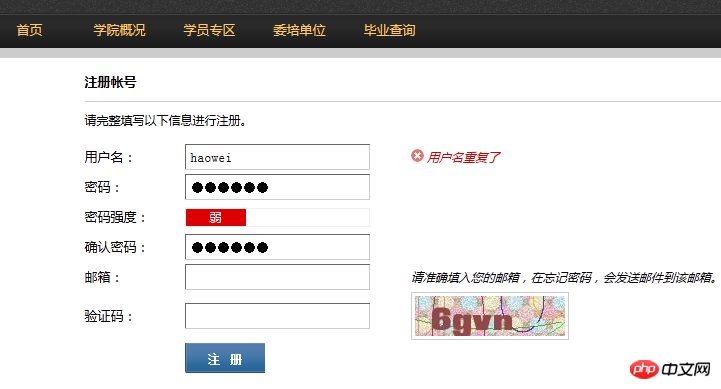
javascript密码强度校验代码,具体实现思路不多说了,请看下面代码和demo。
第一种方法:
/*
 *密码安全程度
 *return :全部为字母或者数字,或者密码长度小于
 *return : 字母数字组成,或者字母特殊字符,或者数字和特殊字符
 *return : 字母和数字和特殊字符
 */
 String.prototype.passwordStrength=function(){
 if(this.length> && this.lengthzuojiankuohaophpcn=) return ;
 var n = (this.search(/[a-zA-Z]/) != -) ? : ,
 n = (this.search(/[-]/) != -) ? : ,
 n =(this.search(/[~`!@#$\%^&*()\_+-=[]|{};":",./zuojiankuohaophpcn>?]{,}/) != -) ? : ;
 return n+n+n;
 }
demo
 zuojiankuohaophpcn!doctype html>
 zuojiankuohaophpcnhtml>
 zuojiankuohaophpcnhead>
 zuojiankuohaophpcnmeta charset="utf-">
 zuojiankuohaophpcntitle>js密码强度zuojiankuohaophpcn/title>
 zuojiankuohaophpcnstyle type="text/css">
 .pw_letter{ margin-top:px; font-size: px; }
 .pw_letter label{float: left; margin-right:px; cursor: default; font-size: px; line-height: px;;}
 .pw_letter span{ float: left; display:inline-block; width:px; height:px; line-height:px; text-align:center; color:#FFF; background-color:#ccc; border-left: px solid #FFF;}
 .pw_letter span.pw_strength_color{ background-color:green;}
 zuojiankuohaophpcn/style>
 zuojiankuohaophpcn/head>
 zuojiankuohaophpcnbody>
 zuojiankuohaophpcninput id="password" type="password" name="password" placeholder="密码" onKeyUp="setPasswordStrength(this.value.trim())">
 zuojiankuohaophpcnp class="pw_letter">zuojiankuohaophpcnlabel>安全程度zuojiankuohaophpcn/label> zuojiankuohaophpcnspan class="strength">弱zuojiankuohaophpcn/span> zuojiankuohaophpcnspan class="strength">中zuojiankuohaophpcn/span> zuojiankuohaophpcnspan class="strength">强zuojiankuohaophpcn/span> zuojiankuohaophpcn/p>
 zuojiankuohaophpcnscript type="text/javascript">
 /*
 *密码安全程度
 *return :全部为字母或者数字,或者密码长度小于
 *return : 字母数字组成,或者字母特殊字符,或者数字和特殊字符
 *return : 字母和数字和特殊字符
 */
 String.prototype.passwordStrength=function(){
 if(this.length> && this.lengthzuojiankuohaophpcn=) return ;
 var n = (this.search(/[a-zA-Z]/) != -) ? : ,
 n = (this.search(/[-]/) != -) ? : ,
 n =(this.search(/[~`!@#$\%^&*()\_+-=[]|{};":",./zuojiankuohaophpcn>?]{,}/) != -) ? : ;
 return n+n+n;
 }
 String.prototype.trim = String.prototype.trim || function(){
 return this.replace(/^s+|s+$/g,"");
 }
 function setPasswordStrength(pwd){
 var strength_span = document.getElementsByClassName("strength");
 for(var i=; izuojiankuohaophpcnstrength_span.length; i++){
  strength_span.item(i).className="strength";
 }
 for(var i=; izuojiankuohaophpcnpwd.passwordStrength(); i++){
  document.getElementsByClassName("strength").item(i).className="strength pw_strength_color";
 }
 }
 zuojiankuohaophpcn/script>
 zuojiankuohaophpcn/body>
第二种方法:
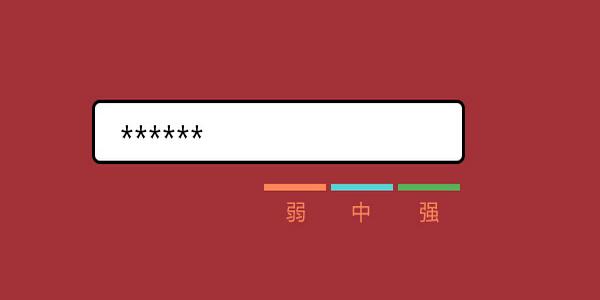
立即学习“Java免费学习笔记(深入)”;
javascript代码如下:
zuojiankuohaophpcnscript>
function AuthPasswd(string) {
 if(string.length >=6) {
 if(/[a-zA-Z]+/.test(string) && /[0-9]+/.test(string) && /W+D+/.test(string)) {
  noticeAssign(1);
 }else if(/[a-zA-Z]+/.test(string) || /[0-9]+/.test(string) || /W+D+/.test(string)) {
  if(/[a-zA-Z]+/.test(string) && /[0-9]+/.test(string)) {
  noticeAssign(-1);
  }else if(/[a-zA-Z]+/.test(string) && /W+D+/.test(string)) {
  noticeAssign(-1);
  }else if(/[0-9]+/.test(string) && /W+D+/.test(string)) {
  noticeAssign(-1);
  }else{
  noticeAssign(0);
  }
 }
 }else{
 noticeAssign(null);
 }
}
function noticeAssign(num) {
 if(num == 1) {
 $("#weak").css({backgroundColor:"#009900"});
 $("#middle").css({backgroundColor:"#009900"});
 $("#strength").css({backgroundColor:"#009900"});
 $("#strength").html("很强");
 $("#middle").html("");
 $("#weak").html("");
 }else if(num == -1){
 $("#weak").css({backgroundColor:"#ffcc33"});
 $("#middle").css({backgroundColor:"#ffcc33"});
 $("#strength").css({backgroundColor:""});
 $("#weak").html("");
 $("#middle").html("中");
 $("#strength").html("");
 }else if(num ==0) {
 $("#weak").css({backgroundColor:"#dd0000"});
 $("#middle").css({backgroundColor:""});
 $("#strength").css({backgroundColor:""});
 $("#weak").html("弱");
 $("#middle").html("");
 $("#strength").html("");
 }else{
 $("#weak").html(" ");
 $("#middle").html(" ");
 $("#strength").html(" ");
 $("#weak").css({backgroundColor:""});
 $("#middle").css({backgroundColor:""});
 $("#strength").css({backgroundColor:""});
 }
}
zuojiankuohaophpcn/script> 




