



下面由sublime教程栏目给大家介绍自定义sublime text3主题,自定义背景色,前景色,选中颜色等字体样式(本人护眼色),希望对需要的朋友有所帮助!
之前有根据"如何优雅使用Sublime Text3(Sublime设置豆沙绿背景色和自定义主题)"这篇文章修改过主题样式,我把作者的主题放入我的包内,但是打开后发现,连侧边栏按键按钮其他的都是绿的,真的是啥都绿的不行,我改回原来的黑色主题,结果发现除了文本编辑区是黑色的,其他地方都还是绿的,我把那个主题从包里删掉了还是不行,搞得我只能重装软件,后来我发现配色的那几个配色方案也在这个包里,我就想能不能通过复制修改里面的文件来达到我要的效果,经过尝试后发现真的可以,以下是我的实现方法:
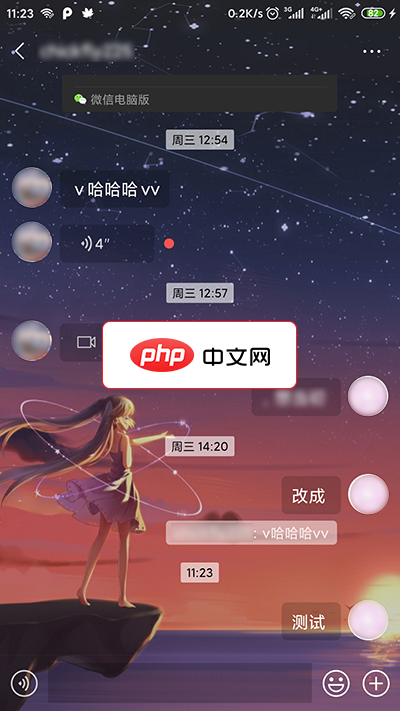
1.先放本人效果图
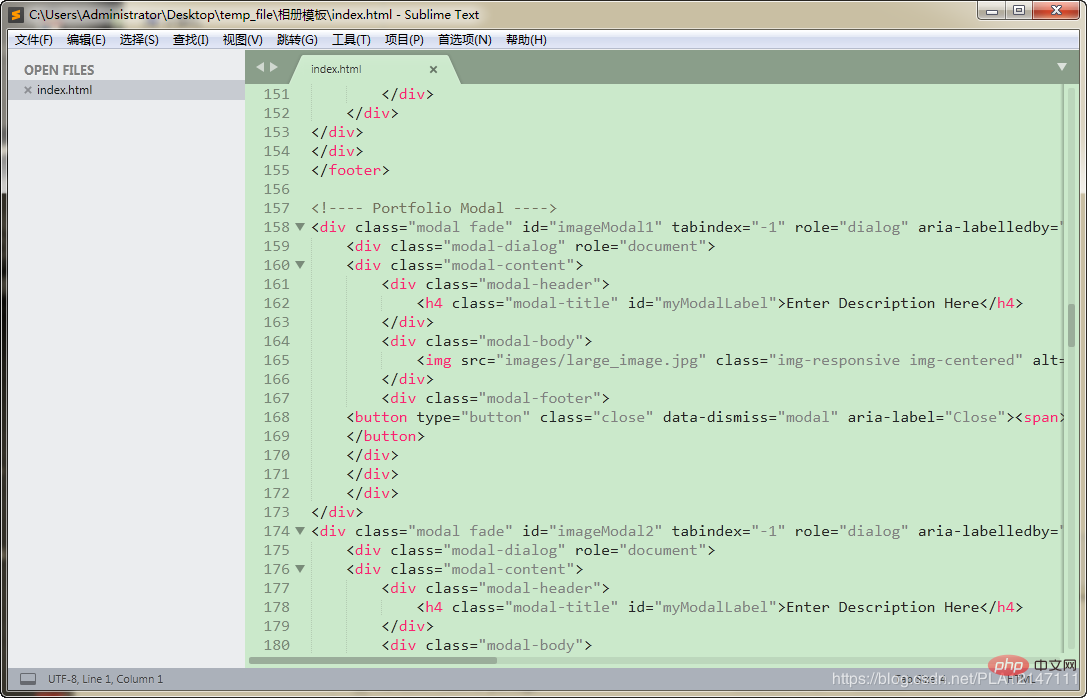
2.修改方式如下:
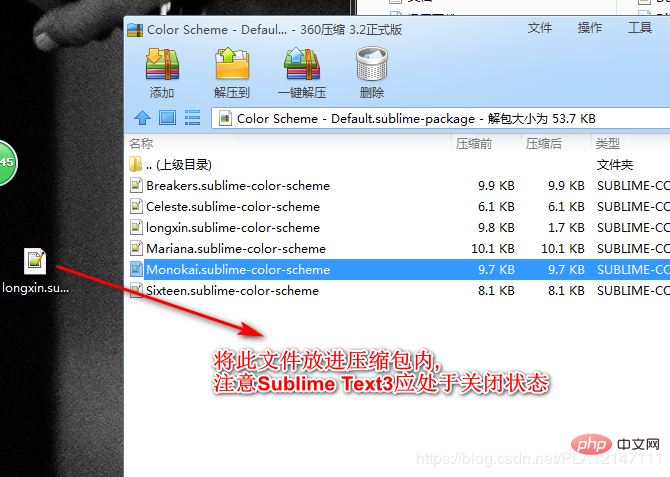
1.打开Sublime Text3/Packages目录下的Color Scheme - Default.sublime-package(以压缩包形式打开)
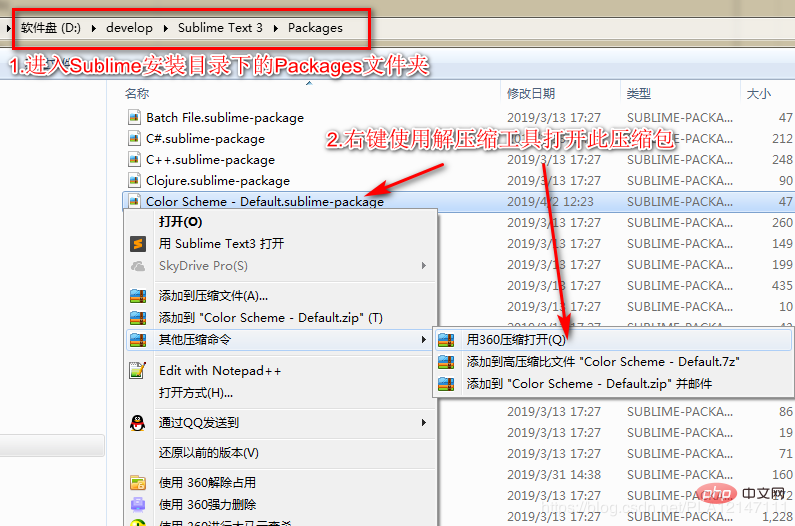
2.右键将Monokai.sublime-color-scheme文件,发送到/桌面
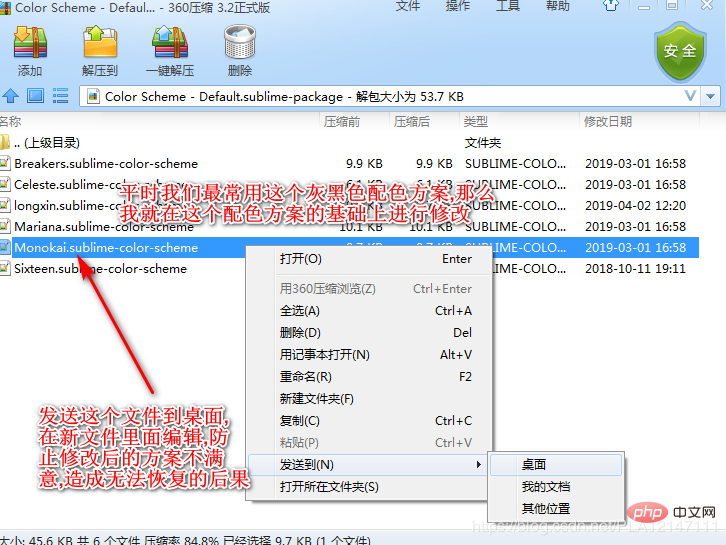
3.修改Monokai.sublime-color-scheme文件颜色参数值
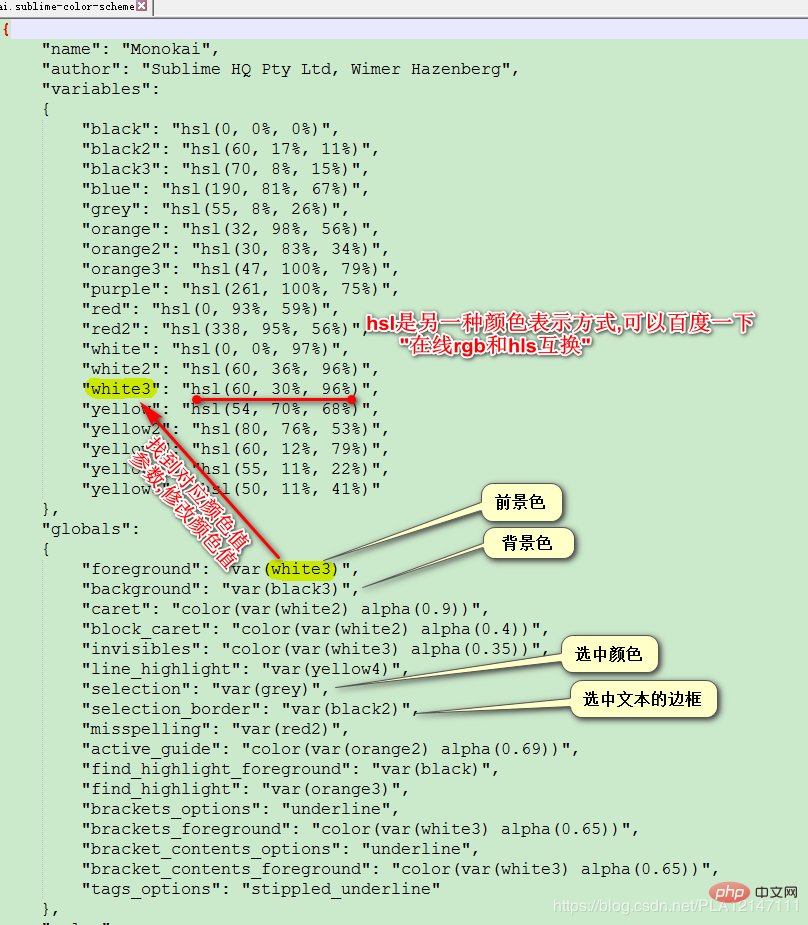
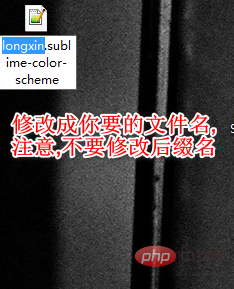
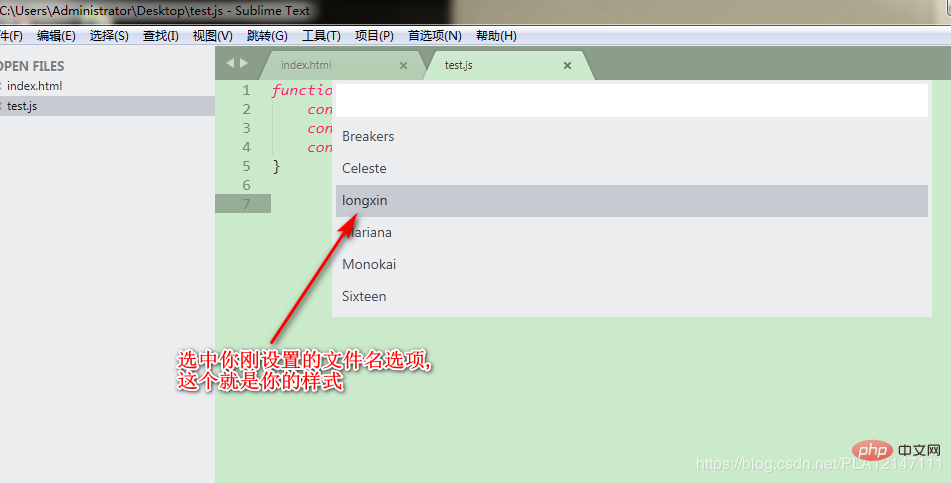
4.修改文件名
5.将修改后的Monokai.sublime-color-scheme文件放入Color Scheme - Default.sublime-package压缩包内
MDWechat是一款xposed插件,能够使使微信Material Design化。功能实现的功能有:1.主界面 TabLayout Material 化,支持自定义图标2.主界面 4 个页面背景修改3.全局 ActionBar 和 状态栏 颜色修改,支持主界面和聊天页面的沉浸主题(4.0新增)4.自动识别微信深色模式以调整MDwechat配色方案(3.6新增)5.主界面添加悬浮按钮(Float
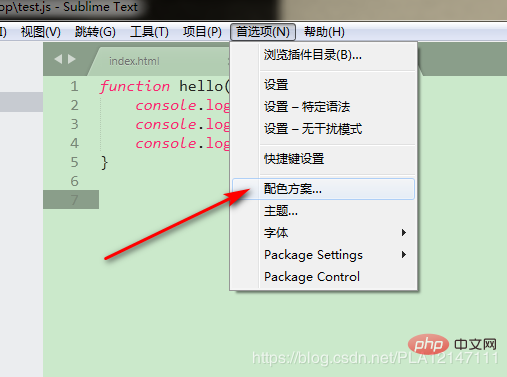
6.修改 首选项/配色方案
7.点击你的配色方案
8.我的配色方案配置文件内容
{
    "name": "longxin",
    "author": "Sublime HQ Pty Ltd, Wimer Hazenberg",
    "variables":
    {
        "black": "hsl(0, 0%, 0%)",
        "selection_border_color": "hsl(60, 17%, 11%)",
        "background_color": "hsl(120°, 40.5%, 85.5%)",
        "blue": "hsl(338°, 94.6%, 56.3%)",
        "selection_color": "hsl(120°, 9.3%, 58.0%)",
        "orange": "hsl(32, 98%, 56%)",
        "orange2": "hsl(30, 83%, 34%)",
        "orange3": "hsl(47, 100%, 79%)",
        "purple": "hsl(261, 100%, 75%)",
        "red": "hsl(0, 93%, 59%)",
        "red2": "hsl(338, 95%, 56%)",
        "white": "hsl(0, 0%, 97%)",
        "white2": "hsl(60, 36%, 96%)",
        "white3": "hsl(0°, 6.5%, 15.1%)",
        "yellow": "hsl(0°, 0.0%, 50.2%)",
        "yellow2": "hsl(0°, 0.0%, 14.1%)",
        "yellow3": "hsl(60, 12%, 79%)",
        "yellow4": "hsl(120°, 9.3%, 58.0%)",
        "yellow5": "hsl(50, 11%, 41%)"
    },
    "globals":
    {
        "foreground": "var(white3)",
        "background": "var(background_color)",
        "caret": "color(var(white2) alpha(0.9))",
        "block_caret": "color(var(white2) alpha(0.4))",
        "invisibles": "color(var(white3) alpha(0.35))",
        "line_highlight": "var(yellow4)",
        "selection": "var(selection_color)",
        "selection_border": "var(selection_border_color)",
        "misspelling": "var(red2)",
        "active_guide": "color(var(orange2) alpha(0.69))",
        "find_highlight_foreground": "var(black)",
        "find_highlight": "var(orange3)",
        "brackets_options": "underline",
        "brackets_foreground": "color(var(white3) alpha(0.65))",
        "bracket_contents_options": "underline",
        "bracket_contents_foreground": "color(var(white3) alpha(0.65))",
        "tags_options": "stippled_underline"
    },
    "rules":
    [
        {
            "name": "Comment",
            "scope": "comment",
            "foreground": "var(yellow5)"
        },
        {
            "name": "String",
            "scope": "string",
            "foreground": "var(yellow)"
        },
        {
            "name": "Number",
            "scope": "constant.numeric",
            "foreground": "var(purple)"
        },
        {
            "name": "Built-in constant",
            "scope": "constant.language",
            "foreground": "var(purple)"
        },
        {
            "name": "User-defined constant",
            "scope": "constant.character, constant.other",
            "foreground": "var(purple)"
        },
        {
            "name": "Variable",
            "scope": "variable"
        },
        {
            "name": "Keyword",
            "scope": "keyword - (source.c keyword.operator | source.c++ keyword.operator | source.objc keyword.operator | source.objc++ keyword.operator), keyword.operator.word",
            "foreground": "var(red2)"
        },
        {
            "name": "Annotation Punctuation",
            "scope": "punctuation.definition.annotation",
            "foreground": "var(red2)"
        },
        {
            "name": "JavaScript Dollar",
            "scope": "variable.other.dollar.only.js",
            "foreground": "var(red2)"
        },
        {
            "name": "Storage",
            "scope": "storage",
            "foreground": "var(red2)"
        },
        {
            "name": "Storage type",
            "scope": "storage.type",
            "foreground": "var(blue)",
            "font_style": "italic"
        },
        {
            "name": "Entity name",
            "scope": "entity.name - (entity.name.filename | entity.name.section | entity.name.tag | entity.name.label)",
            "foreground": "var(yellow2)"
        },
        {
            "name": "Inherited class",
            "scope": "entity.other.inherited-class",
            "foreground": "var(yellow2)",
            "font_style": "italic underline"
        },
        {
            "name": "Function argument",
            "scope": "variable.parameter - (source.c | source.c++ | source.objc | source.objc++)",
            "foreground": "var(orange)",
            "font_style": "italic"
        },
        {
            "name": "Language variable",
            "scope": "variable.language",
            "foreground": "var(orange)",
            "font_style": "italic"
        },
        {
            "name": "Tag name",
            "scope": "entity.name.tag",
            "foreground": "var(red2)"
        },
        {
            "name": "Tag attribute",
            "scope": "entity.other.attribute-name",
            "foreground": "var(yellow2)"
        },
        {
            "name": "Function call",
            "scope": "variable.function, variable.annotation",
            "foreground": "var(blue)"
        },
        {
            "name": "Library function",
            "scope": "support.function, support.macro",
            "foreground": "var(blue)"
        },
        {
            "name": "Library constant",
            "scope": "support.constant",
            "foreground": "var(blue)"
        },
        {
            "name": "Library class/type",
            "scope": "support.type, support.class",
            "foreground": "var(blue)",
            "font_style": "italic"
        },
        {
            "name": "Library variable",
            "scope": "support.other.variable"
        },
        {
            "name": "Invalid",
            "scope": "invalid",
            "foreground": "var(white2)",
            "background": "var(red2)"
        },
        {
            "name": "Invalid deprecated",
            "scope": "invalid.deprecated",
            "foreground": "var(white2)",
            "background": "var(purple)"
        },
        {
            "name": "JSON String",
            "scope": "meta.structure.dictionary.json string.quoted.double.json",
            "foreground": "var(yellow3)"
        },
        {
            "name": "YAML String",
            "scope": "string.unquoted.yaml",
            "foreground": "var(white3)"
        },
        {
            "name": "diff.header",
            "scope": "meta.diff, meta.diff.header",
            "foreground": "var(yellow5)"
        },
        {
            "name": "markup headings",
            "scope": "markup.heading",
            "font_style": "bold"
        },
        {
            "name": "markup headings",
            "scope": "markup.heading punctuation.definition.heading",
            "foreground": "var(orange)"
        },
        {
            "name": "markup h1",
            "scope": "markup.heading.1 punctuation.definition.heading",
            "foreground": "var(red2)"
        },
        {
            "name": "markup links",
            "scope": "markup.underline.link",
            "foreground": "var(blue)"
        },
        {
            "name": "markup bold",
            "scope": "markup.bold",
            "font_style": "bold"
        },
        {
            "name": "markup italic",
            "scope": "markup.italic",
            "font_style": "italic"
        },
        {
            "name": "markup bold/italic",
            "scope": "markup.italic markup.bold | markup.bold markup.italic",
            "font_style": "bold italic"
        },
        {
            "name": "markup hr",
            "scope": "punctuation.definition.thematic-break",
            "foreground": "var(yellow5)"
        },
        {
            "name": "markup blockquote",
            "scope": "markup.quote punctuation.definition.blockquote",
            "foreground": "var(yellow5)"
        },
        {
            "name": "markup bullets",
            "scope": "markup.list.numbered.bullet",
            "foreground": "var(purple)"
        },
        {
            "name": "markup bullets",
            "scope": "markup.list.unnumbered.bullet | (markup.list.numbered punctuation.definition)",
            "foreground": "color(var(white) alpha(0.67))"
        },
        {
            "name": "markup code",
            "scope": "markup.raw",
            "background": "color(var(white) alpha(0.094))"
        },
        {
            "name": "markup punctuation",
            "scope": "markup.raw punctuation.definition.raw",
            "foreground": "color(var(white) alpha(0.67))"
        },
        {
            "name": "markup punctuation",
            "scope": "text & (punctuation.definition.italic | punctuation.definition.bold | punctuation.definition.raw | punctuation.definition.link | punctuation.definition.metadata | punctuation.definition.image | punctuation.separator.table-cell | punctuation.section.table-header | punctuation.definition.constant)",
            "foreground": "color(var(white) alpha(0.67))"
        },
        {
            "name": "diff.deleted",
            "scope": "markup.deleted",
            "foreground": "var(red2)"
        },
        {
            "name": "diff.inserted",
            "scope": "markup.inserted",
            "foreground": "var(yellow2)"
        },
        {
            "name": "diff.changed",
            "scope": "markup.changed",
            "foreground": "var(yellow)"
        },
        {
            "scope": "constant.numeric.line-number.find-in-files - match",
            "foreground": "color(var(purple) alpha(0.63))"
        },
        {
            "scope": "entity.name.filename",
            "foreground": "var(yellow)"
        },
        {
            "scope": "message.error",
            "foreground": "var(red)"
        },

        {
            "scope": "diff.deleted",
            "background": "hsla(338, 50%, 56%, 0.15)",
            "foreground_adjust": "l(+ 5%)"
        },
        {
            "scope": "diff.deleted.char",
            "background": "hsla(338, 65%, 56%, 0.30)",
            "foreground_adjust": "l(+ 10%)"
        },
        {
            "scope": "diff.inserted",
            "background": "hsla(80, 50%, 53%, 0.15)",
            "foreground_adjust": "l(+ 5%)"
        },
        {
            "scope": "diff.inserted.char",
            "background": "hsla(80, 65%, 53%, 0.30)",
            "foreground_adjust": "l(+ 10%)"
        },
    ]
}
8.很兴奋有木有,问题解决了吗?能用红包表示的,暂就不用多言语了....




