



需要实现的组件效果:
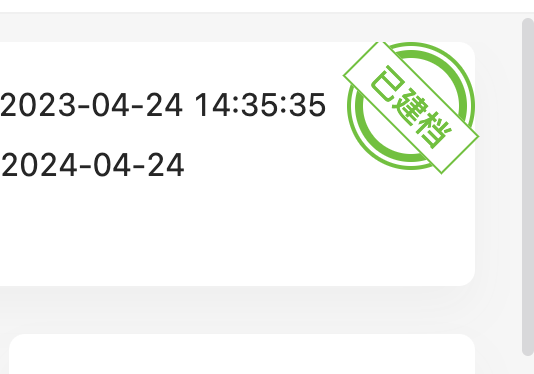
该组件有设置颜色、大小、旋转度数和文本内容功能。
一、组件实现代码
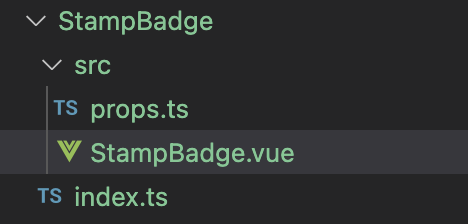
组件代码文件结构
立即学习“前端免费学习笔记(深入)”;
src/components/StampBadge/src/StampBadge.vue 文件代码

<template>
  <div
    class="first-ring"
    v-bind="getBindValue"
    :class="getStampBadgeClass"
    :
  >
    <div class="second-ring" :class="getStampBadgeClass">
      <div class="third-ring" :class="getStampBadgeClass">
        <div class="forth-ring" :class="getStampBadgeClass">
          <div class="content-rectangle ellipsis" :class="getStampBadgeClass">
            <span class="">{{ content }}</span>
          </div>
        </div>
      </div>
    </div>
  </div>
</template>

<script lang="ts">
  import { defineComponent } from "vue";
  export default defineComponent({
    name: "StampBadge",
    inheritAttrs: false,
  });
</script>

<script lang="ts" setup>
  import { computed, unref } from "vue";
  import { stampBadgeProps } from "./props";
  import { useAttrs } from "/@/hooks/core/useAttrs";

  const props = defineProps(stampBadgeProps);
  // get component class
  const attrs = useAttrs({ excludeDefaultKeys: false });
  const getStampBadgeClass = computed(() => {
    const { color, size } = props;
    return [
      {
        [`stamp-badge-${color}`]: !!color,
        [`stamp-badge-${size}`]: !!size,
      },
    ];
  });

  // get inherit binding value
  const getBindValue = computed(() => ({ ...unref(attrs), ...props }));
</script>

<style lang="less" scoped>
  .first-ring {
    border-radius: 100px;
    display: flex;
    justify-content: center;
    align-items: center;
  }

  .second-ring {
    background: #fff;
    border-radius: 100px;
    display: flex;
    justify-content: center;
    align-items: center;
  }

  .third-ring {
    border-radius: 100px;
    display: flex;
    justify-content: center;
    align-items: center;
  }

  .forth-ring {
    background: #fff;
    border-radius: 100px;
    display: flex;
    justify-content: center;
    align-items: center;
    position: relative;
  }

  .content-rectangle {
    background: #fff;
    font-weight: bold;
    text-align: center;
    position: absolute;
  }

  .ellipsis {
    overflow: hidden;
    white-space: nowrap;
    text-overflow: ellipsis;
  }

  // primary
  .stamp-badge-primary.first-ring {
    background: #1890ff;
  }
  .stamp-badge-primary.third-ring {
    background: #1890ff;
  }
  .stamp-badge-primary.content-rectangle {
    border: 1px solid #1890ff;
    color: #1890ff;
  }
  // success
  .stamp-badge-success.first-ring {
    background: #52c41a;
  }
  .stamp-badge-success.third-ring {
    background: #52c41a;
  }
  .stamp-badge-success.content-rectangle {
    border: 1px solid #52c41a;
    color: #52c41a;
  }
  // error
  .stamp-badge-error.first-ring {
    background: #ff4d4f;
  }
  .stamp-badge-error.third-ring {
    background: #ff4d4f;
  }
  .stamp-badge-error.content-rectangle {
    border: 1px solid #ff4d4f;
    color: #ff4d4f;
  }
  // warning
  .stamp-badge-warning.first-ring {
    background: #faad14;
  }
  .stamp-badge-warning.third-ring {
    background: #faad14;
  }
  .stamp-badge-warning.content-rectangle {
    border: 1px solid #faad14;
    color: #faad14;
  }
  // info
  .stamp-badge-info.first-ring {
    background: #ccc;
  }
  .stamp-badge-info.third-ring {
    background: #ccc;
  }
  .stamp-badge-info.content-rectangle {
    border: 1px solid #ccc;
    color: #ccc;
  }
  // large
  .stamp-badge-large.first-ring {
    width: 84px;
    height: 84px;
  }
  .stamp-badge-large.second-ring {
    width: 80px;
    height: 80px;
  }
  .stamp-badge-large.third-ring {
    width: 74px;
    height: 74px;
  }
  .stamp-badge-large.forth-ring {
    width: 64px;
    height: 64px;
  }
  .stamp-badge-large.content-rectangle {
    width: 90px;
    font-size: 1.2rem;
  }
  // middle
  .stamp-badge-middle.first-ring {
    width: 64px;
    height: 64px;
  }
  .stamp-badge-middle.second-ring {
    width: 60px;
    height: 60px;
  }
  .stamp-badge-middle.third-ring {
    width: 56px;
    height: 56px;
  }
  .stamp-badge-middle.forth-ring {
    width: 48px;
    height: 48px;
  }
  .stamp-badge-middle.content-rectangle {
    width: 70px;
    font-size: 1rem;
  }
  // small
  .stamp-badge-small.first-ring {
    width: 54px;
    height: 54px;
  }
  .stamp-badge-small.second-ring {
    width: 50px;
    height: 50px;
  }
  .stamp-badge-small.third-ring {
    width: 46px;
    height: 46px;
  }
  .stamp-badge-small.forth-ring {
    width: 38px;
    height: 38px;
  }
  .stamp-badge-small.content-rectangle {
    width: 60px;
    font-size: 0.8rem;
  }
</style>
src/components/StampBadge/src/props.ts 文件代码
export const stampBadgeProps = {
  color: {
    type: String,
    default: "primary",
    validator: (v) =>
      ["primary", "error", "warning", "success", "info"].includes(v),
  },
  /**
   * stamp badge size.
   * @default: middle
   */
  size: {
    type: String,
    default: "middle",
    validator: (v) => ["large", "middle", "small"].includes(v),
  },
  /**
   * stamp badge rotate deg.
   * @default: 0
   */
  rotate: { type: Number, default: 0 },
  content: { type: String, default: "Unknown" },
};
src/components/StampBadge/index.ts 文件代码
import { withInstall } from "/@/utils";
import type { ExtractPropTypes } from "vue";
import stampbadge from "./src/StampBadge.vue";
import { stampBadgeProps } from "./src/props";

export const StampBadge = withInstall(stampbadge);
export declare type ButtonProps = Partial<
  ExtractPropTypes<typeof stampBadgeProps>
>;
src/utils/index.ts 文件代码
export const withInstall = <T>(component: T, alias?: string) => {
  const comp = component as any;
  comp.install = (app: App) => {
    app.component(comp.name || comp.displayName, component);
    if (alias) {
      app.config.globalProperties[alias] = component;
    }
  };
  return component as T & Plugin;
};
二、组件全局注册代码
src/components/registerGlobComp.ts 文件代码
import type { App } from "vue";
import { StampBadge } from "./StampBadge";

export function registerGlobComp(app: App) {
  app.use(StampBadge);
}
src/main.ts 文件代码
import { createApp } from "vue";
import App from "./App.vue";
import { registerGlobComp } from "/@/components/registerGlobComp";

async function bootstrap() {
  // 创建应用实例
  const app = createApp(App);
  // 注册全局组件
  registerGlobComp(app);
  // 挂载应用
  app.mount("#app", true);
}

bootstrap();
三、组件应用代码
<div >
  <StampBadge

    size="middle"
    color="success"
    content="已建档"
    :rotate="45"
  />
</div> 




